
(Affiliate Disclosure: As an Amazon Associate, I earn from qualifying purchases. This comes at no extra cost to you and helps support our content.)
Tax season is coming, and finding the best portable scanners for receipts is the first step to staying organized.
Let’s be honest: looking at a shoebox full of crumpled, fading thermal receipts is the stuff of nightmares.
With tax season looming on the horizon, the panic of “Where did I put that deductible expense?” starts to set in. We’ve all been there—scrambling to find that one specific invoice from six months ago, only to realize the ink has faded into oblivion.
In 2026, there is absolutely no reason to hoard paper. The IRS accepts digital copies, and your accountant will thank you for not handing them a bag of paper scraps.
While smartphone apps are okay for the occasional scan, they are slow, prone to lighting glares, and terrible for batch processing. If you want to survive tax season with your sanity intact, you need a dedicated tool.
Here are the best portable scanners to digitize your financial life instantly, clear the clutter, and audit-proof your records.
Why You Need a Dedicated Portable Scanner (Not Just Your Phone)
You might be asking, “Can’t I just take a picture with my phone?”
Technically, yes. But practically? It’s a pain.
When evaluating the best portable scanners for receipts, we looked at speed, OCR accuracy, and portability.
Speed: Portable scanners can feed through a receipt in under 4 seconds. Trying to line up, focus, and crop 50 receipts on a phone takes forever.
Quality & OCR: Dedicated scanners flatten the paper, removing wrinkles and shadows. More importantly, they come with powerful OCR (Optical Character Recognition) software that makes your receipts searchable. Imagine typing “Office Supplies” and instantly finding every relevant receipt.
Automation: The scanners below can automatically route your files to Dropbox, Google Drive, or QuickBooks with a single button press.
1. The Gold Standard: Ricoh ScanSnap iX100 Wireless Mobile Scanner
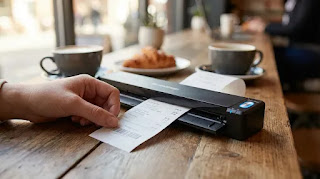
If you ask any digital nomad or small business owner what scanner they swear by, 9 out of 10 will say the ScanSnap. Formerly branded as Fujitsu, the Ricoh ScanSnap iX100 remains the undisputed king of mobile scanning.It is completely wireless, battery-powered, and ridiculously fast. Its “Dual Scan” feature even allows you to scan two small receipts simultaneously.Key Features:
Speed: 5.2 seconds per page.
Connectivity: Wi-Fi and USB.
Power: Built-in rechargeable Li-ion battery.
Software: Includes ScanSnap Home (excellent for auto-categorizing).
Pros:
True wireless freedom (scan directly to the cloud without a PC).
Automatically stitches together folded A3 documents.
Battery life is impressive for its size.
Cons:
Pricier than basic USB-only models.
No double-sided scanning (simplex only).
2. The Ultra-Compact Choice: Epson WorkForce ES-50
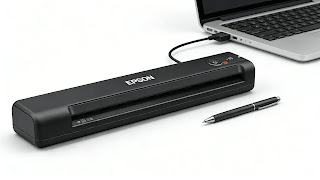
If your primary goal is to keep your laptop bag light, the Epson WorkForce ES-50 is a marvel of engineering. It is one of the lightest mobile scanners in its class.Note that this model is USB-powered, meaning it doesn’t have a built-in battery—you need to plug it into your laptop. However, this makes it incredibly reliable (no dead batteries) and significantly lighter. It’s perfect for the “starving artist” or freelancer who just needs to digitize receipts on the go.Key Features:
Speed: Blazing fast (approx. 5.5 seconds per page).
Weight: Under 0.6 lbs (lighter than a soda can).
Power: USB-powered (No wall adapter needed).
Pros:
Incredibly small footprint.
Very easy to set up; plug and play.
Software creates searchable PDFs (OCR) automatically.
Cons:
Tethered to your laptop (not wireless).
Must feed sheets one by one manually.
3. The Power User: Brother DS-940DW Duplex & Wireless
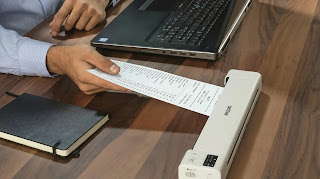
Do you have double-sided invoices, W-2 forms, or contracts? The Brother DS-940DW is the beast you need.The “DW” stands for Duplex Wireless. This machine scans both sides of a document in a single pass. It also features a unique “U-path” paper feed system, where the paper goes in the front and curves back out the top, meaning you don’t need extra desk space behind the scanner.Key Features:
Duplex: Scans both sides at once (Single-pass duplex).
Speed: Up to 15 ppm (pages per minute).
Storage: Can scan directly to a microSD card (no computer needed).
Pros:
Massive time saver for 2-sided documents.
Can operate completely standalone with an SD card.
Vertical paper return saves desk space.
Cons:
Heavier and bulkier than the Epson ES-50.
Setup can be slightly more complex due to the many features.
Buyer’s Guide: How to Choose Before Tax Day
Still undecided? Here is a quick cheat sheet to help you pick the right tool for your tax prep battle:
Feature Ricoh ScanSnap iX100 Epson WorkForce ES-50 Brother DS-940DW Best For Wireless Convenience Budget & Portability Heavy Duty / 2-Sided Connection Wi-Fi & USB USB Only Wi-Fi & USB Battery Yes No (Laptop Power) Yes Duplex No No Yes Weight Medium Lightest Heaviest
Pro Tip: Whichever scanner you choose, enable the “Scan to Searchable PDF” option in the settings. This ensures that in 3 years, when you need to find a receipt for “Dinner with Client,” you can just search for the text instantly on your computer.
FAQ: Digitizing Receipts for Taxes
Q: Does the IRS accept digital receipts?
A: Yes. The IRS has accepted digital copies of receipts for years, provided they are legible and accurate. In fact, digital copies are safer because they don’t fade or get destroyed by water/fire.Q: Do I need to keep the paper originals?
A: Most tax professionals recommend keeping the physical copies until your tax return is accepted and the refund is processed. After that, a secure digital backup (cloud + hard drive) is generally sufficient, but always check with your CPA.Q: How do I organize the files?
A: Don’t just dump them in one folder. Create a structure:Year > Category > Month.Example:
2025 Taxes > Medical Expenses > January_Receipt.pdf
Conclusion: Don’t Let the Paper Win
Tax season is stressful enough without having to dig through piles of fading paper.Investing in a portable scanner is one of those “adulting” upgrades that pays for itself immediately. Whether you choose the premium Ricoh ScanSnap, the featherlight Epson, or the powerful Brother, the result is the same: peace of mind.Get your receipts scanned, get your deductions filed, and get back to enjoying your new year.Investing in one of the best portable scanners for receipts will save you hours of manual data entry during tax time.
Ready to organize the chaos?


Want more gear recommendations? Head back to our homepage to see all our 2026 tech comparisons.