
(As an Amazon Associate, I earn from qualifying purchases. This means if I recommend a product and you buy it, I may receive a small commission at no extra cost to you.)
Let’s be honest: You aren’t going to buy an 85-inch OLED TV just for the Super Bowl. But with the Govee TV Backlight 3 Lite, there is a way to make your current 4K TV feel twice as big and ten times more expensive.
It’s called Bias Lighting, and specifically, the Govee TV Backlight 3 Lite.
Here is why this sub-$100 gadget is the MVP of your Super Bowl setup.
What is the Govee TV Backlight 3 Lite?
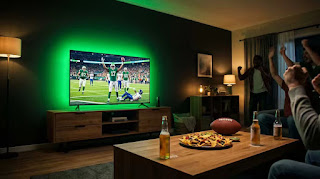
Unlike standard LED strips that just glow one static color, the Govee system uses a small camera mounted on top of your TV. This camera “watches” your screen in real-time and tells the LED strip behind the TV to mimic the colors instantly.
When the field is green, your wall glows green. When the halftime show explodes in fireworks, your entire living room flashes in sync. It breaks the “fourth wall” of your television.
👉 Check Current Price: Govee TV Backlight 3 Lite with Envisual Technology
Why It’s Essential for Sports (Real-World Test)
I tested this setup during the playoffs, and the immersion is immediate.
The “Touchdown” Effect
When a team scores, the screen usually flashes with team colors. With the Govee installed, that explosion of color floods your peripheral vision. It feels less like watching on a TV and more like being in the stadium.
Why not a cheap $15 USB strip?
Cheap strips are static. You have to use a remote to change the color manually. During a fast-paced game, you can’t be fiddling with a remote. You need Envisual Technology that reacts automatically to every play.
Comparison: Govee 3 Lite vs. Envisual T2
You will see a few versions on Amazon. Here is the quick breakdown so you don’t overspend.
👉 See the difference here: Compare Govee Models on Amazon

Installation: Is it Hard?
You do not need to be a tech expert.
-
-
Clean the back of your TV: Use the alcohol wipes provided. This is crucial for the adhesive.
-
Stick the strip: The new clips on the 3 Lite make corners easier than older models.
-
Calibrate: The app asks you to place orange foam squares on your screen to calibrate the camera. Do not skip this. It tells the camera exactly where the screen ends.
-
Pros & Cons
Pros:
-
-
✅ Insane Value: Completely changes the room dynamics for a low cost.
-
✅ Reduced Eye Strain: The bias lighting increases perceived contrast and lowers eye fatigue in dark rooms.
-
✅ Smart Home Ready: Works with Alexa and Google Assistant. “Alexa, turn on Game Mode.”
-
Cons:
-
-
❌ The Camera Bump: You will have a small camera on top of your TV. It’s noticeable at first, though you eventually ignore it.
-
❌ Reflections: If you have a very glossy TV screen or a lamp directly opposite the TV, the camera might pick up the glare.
-
The “Ecosystem” Upgrade
If you want to go all out for the party, Govee allows you to sync other lights to the TV backlight.
My Suggestion:
Pair the TV backlight with Govee Smart Light Bars. Place them on the floor or entertainment center. When the TV explodes with color, the whole room reacts.
Final Verdict: Buy it Before Kickoff?
If you are hosting, yes. The Govee TV Backlight 3 Lite is the single most effective upgrade you can make to your entertainment center right now.
It arrives quickly with Prime, takes 20 minutes to set up, and will keep your guests talking long after the final whistle.
👉 Check Stock for Govee TV Backlight 3 Lite on Amazon
FAQ
Q: Does this work with any TV brand?
A: Yes. Since it uses an external camera to “see” the screen, it works with Samsung, LG, Sony, and Roku TVs. Just ensure you select the correct size option (55-65 inch or 75-85 inch).
Q: Can I use this for movies too?
A: Absolutely. It enhances action movies significantly. For regular news or drama, you can switch it to “Solid Color” mode via the app for a calm bias lighting effect.
Q: Is the camera recording me?
A: No. The camera points strictly at the screen to process color data locally. It does not record or upload video of your room.
Want more gear recommendations? Head back to our homepage to see all our 2026 tech comparisons.